
How to Create a Child Theme
-
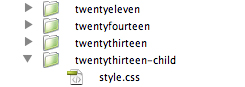
Create a directory in your themes directory to hold the child theme. The theme directory is wp-content/themes. You should name the directory without any space as part of the name, and it is common practice to use the name of the parent theme folder with “-child” appended to it. For example, if you are making a child of the twentyfourteen theme, your folder name would be twentyfourteen-child.

- In the child theme directory, create a file called style.css. This is the only file required to make a child theme. The style sheet must start with the following lines:
/*
 Theme Name:   Twenty Fourteen Child
 Theme URI:    http://example.com/twenty-fourteen-child/
 Description:  Twenty Fourteen Child Theme
 Author:       John Doe
 Author URI:   http://example.com
 Template:     twentyfourteen
 Version:      1.0.0
 Tags:         light, dark, two-columns, right-sidebar, responsive-layout, accessibility-ready
 Text Domain:  twenty-fourteen-child
*/

@import url("../twentyfourteen/style.css");

/* =Theme customization starts here
-------------------------------------------------------------- */
You can change each of these lines to suit your theme. The only required lines are the Theme Name, and the Template. The Template is the directory name of the parent theme. In this case, the parent theme is the TwentyFourteen theme, so the Template is twentyfourteen, which is the name of the directory where the TwentyFourteen theme resides. If you want to make a child of a theme with the directory name example-theme-name, then you would use Template: example-theme-name.
- The child theme’s stylesheet is included after the parent theme’s and styles will therefore override those in the parent theme’s stylesheet.
- Activate the child theme. Log in to your site’s dashboard, and go to Administration Panels > Appearance > Themes. You will see your child theme listed there. Click Activate.
(If your wordpress is running in multi-site mode, you may need to switch to the network admin dashboard, then themes, then click network enable. Then you switch to regular admin dashboard and the above step to activate your child theme should be present)
from http://codex.wordpress.org/Child_Themes