
http://www.jacobtomlinson.co.uk/2014/10/17/use-xbox-360-pad-with-yosemite/
Archiv für den Monat: Juli 2015
Chromium Updater
https://mrgeckosmedia.com/applications/info/chromatic
Kleines Tool das den Chromium-Browser aktualisiert.
oder
https://chrome.google.com/webstore/detail/chromium-updater/ccgjmadhdidfloacagcnnodbkedkjedg/related
Browser-Plugin für Chromimum
HTML-Code aus Emails in normales HTML umwandeln
Wenn eine Email mit Outlook weitergeleitet wird, wird das darin enthaltene HMTL in das „Quoted Printable“ Format encodiert.
Zurückwandeln lässt es sich z.B. mit:
http://www.motobit.com/util/quoted-printable-decoder.asp
OSX Anzeige der benutzten Ports
lsof -i -n -P | grep TCP
Es werden die geöffneten Ports und die dazugehörige Anwendung angezeit.
Remove Cat before flight
Kann man mp3 von flac unterscheiden?
Hier der Test. Es werden zu fünf Musikstücken drei Varianten vorgespielt. Der User wählt aus was er für das beste, mittlere etc hält.
Bilder für Webseiten optimieren
Der Online-Converter TinyPNG.com hat es bei meinem Beispiel-JPG von 4MB auf gut 500 kB gebracht.
WordPress umgezogen und jetzt weisse Seite
Per FTP die wp-config.php öffnen. Dort die Zeile
define(‚RELOCATE‘, true);
eintragen. Anschliessend kann das Admin-Interface über http://deineseite.de/wp-login.php geöffnet werden. Im Bereich Allgemeine Einstellungen jetzt die neue Site-URL eintragen.
Alternativ per Datenbank:
wp_options Tabelle öffnen und die Felder siteurl und home anpassen.
CMS als Notizbuch nutzen
Das Plugin scribefire bietet ein flinkes Browser-Interface für WordPress und Joomla CMS. Über ein minimales Interface ist es möglich Beiträge anzulegen oder zu editieren. Die Anmeldedaten werden im Browser gespeichert. An Bord ist ein brauchbarer WYSIWYG-Editor der auch auf pures HTML umgeschaltet werden kann. Weiterlesen
WordPress Child-Themes
How to Create a Child Theme
-
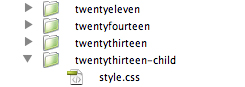
Create a directory in your themes directory to hold the child theme. The theme directory is wp-content/themes. You should name the directory without any space as part of the name, and it is common practice to use the name of the parent theme folder with “-child” appended to it. For example, if you are making a child of the twentyfourteen theme, your folder name would be twentyfourteen-child.

- In the child theme directory, create a file called style.css. This is the only file required to make a child theme. The style sheet must start with the following lines:
Weiterlesen